Creating Regions MeshCore Repeater
Quick Reference Guide
In a growing MeshCore network, messages sent via “Flood Routing” can easily bounce across continents, congesting the radio band with traffic irrelevant to local users. Regions solve this by creating intelligent geographic boundaries so that repeaters only forward messages scoped to their specific area.
To configure Regions successfully, ensure your repeater is running MeshCore firmware 1.15.0 or newer, and your companion app is updated to at least version 1.43.0.
Here are the two ways to configure regions on your repeater node.
Method 1: Using the MeshCore App (Remote Management)
This is the easiest method if your repeater is already deployed and paired with a companion node.
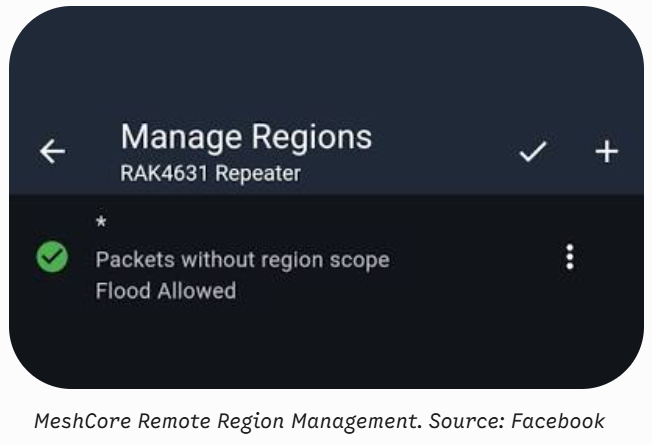
1.Access Region Management:
Open the MeshCore app, connect to your repeater via Remote Management, and navigate to Settings > Manage Regions.
2.Add Regional Codes:
Tap the + button in the top right to add your desired regions. Best practice is to add one broad region (e.g., us or europe) and one local region (e.g., us-co for Colorado, or ch-de for German-speaking Switzerland).
3.Allow Flood for Specific Regions:
For each region you just added, tap the three dots next to the region name and select Allow Flood.
4.Restrict Global Flooding:
To enforce your new boundaries, locate the wildcard region * in the list, tap its three dots, and ensure Allow Flood is disabled.
5.Set the Default Region Scope:
Open the menu in the top right of the Region Management screen and select Default Region Scope. Enter your primary broad region (e.g., us or ch). This ensures your repeater’s own adverts aren’t dropped by the network.
6.Save and Apply:
Tap the checkmark (✓) in the top right corner to permanently write these settings to the repeater.
Method 2: Using the Command Line Interface (CLI)
If you are building the node on your bench or prefer serial configuration, you can assign regions via a direct USB serial connection using the CLI.
- Establish a CLI connectionto your repeater over USB serial.
- Add a broad region name:
Bashregion put us - Add a hierarchical local region: By referencing the broad region at the end of the command, you establish a parent-child relationship (messages scoped to the parent will still propagate through the child).
Bashregion put us-co us - Verify your setup: Run the
regioncommand to check your list. In newer firmware,region putdefaults to enabling flood forwarding, but it’s important to verify this. - Save the configuration:
Bashregion save
A note on naming conventions: Regions are limited to 29 bytes and can only contain lowercase letters (a-z), numbers (0-9), and hyphens (-). Coordinate with your local MeshCore community (via local forums or Discord) to ensure you are using the exact same regional codes as the surrounding infrastructure.
See also: Manage MeshCore Regions (link)
See what other MeshCore Communities are doing;
https://cascadiamesh.org/regions/ (https://gessaman.com/meshcore/regions/)


Leave a Reply